Leadspace Sidekick Chrome Extension
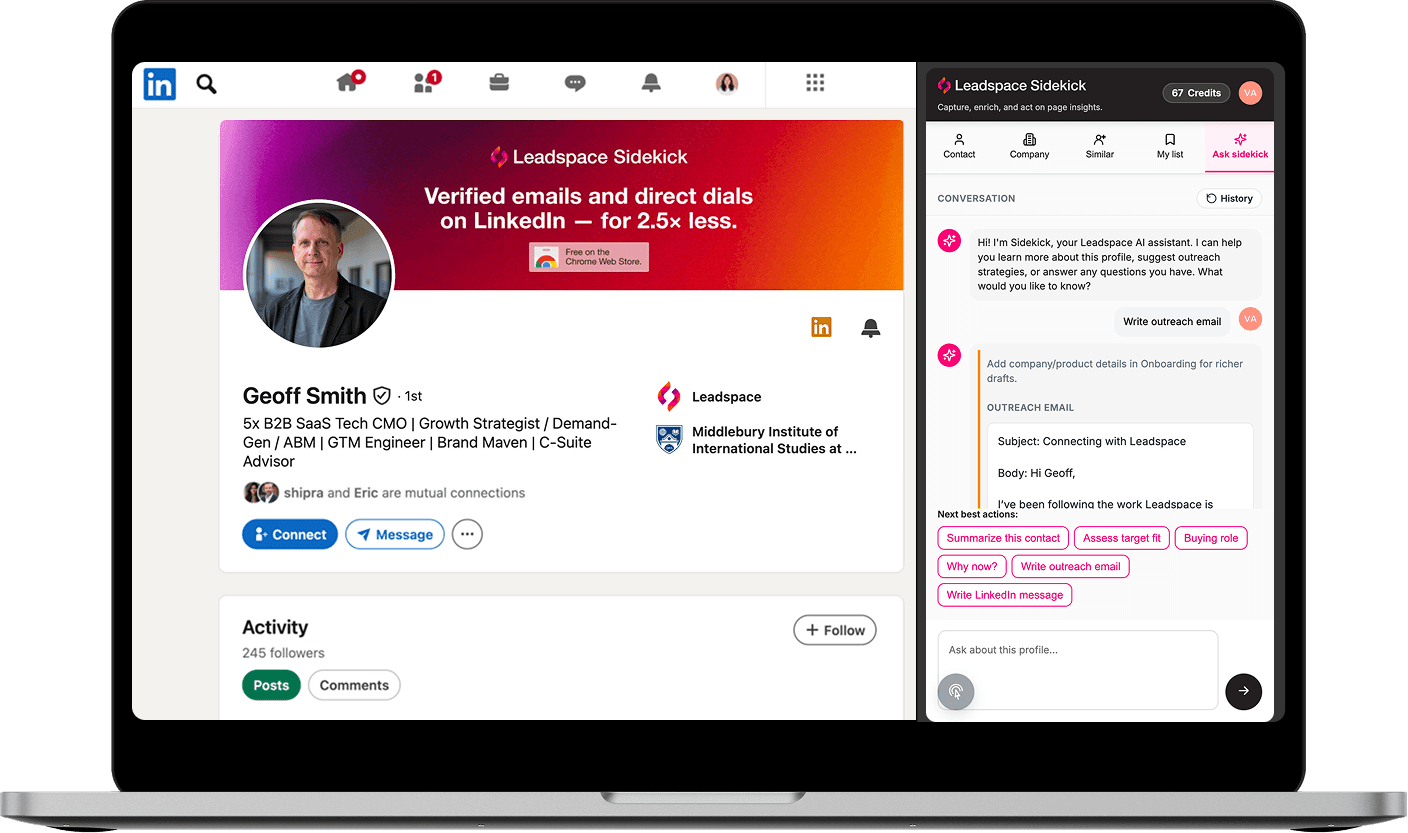
The contact data you need. The AI that turns it into pipeline.
Enterprise B2B intelligence on LinkedIn. Free to start.
Less expensive than
ZoomInfo & Apollo
Faster time-per-lead vs.
manual research
Fit scoring, outreach drafting & buying group intelligence built in
Technology categories in the data graph

What Sidekick Does
Three things no other tool does at this price.
Explore each one. Every capability is powered by 800M+ buyer identities — the same data graph used by Microsoft, Nvidia, and Salesforce.
The Foundation — Verified contact data, revealed instantly
Emails, direct dials, firmographics, tech stack. One click.
● Verified emails & direct phone numbers
Revealed on any LinkedIn profile
● Company firmographics & org hierarchy
Size, revenue, industry, parent and subsidiaries
● Technology stack
— 100+ categories, continuously updated
— not batch-refreshed monthly
The Difference — AI that works the whole sales workflow
Fit scoring, outreach drafting, buying committee mapping, job change detection.
● Fit Scoring
Instant score against your Target Audience with a plain-language explanation.
● Outreach Drafting
Cold emails, LinkedIn messages, call scripts — personalised to the contact's profile.
● Buying Committee
Map Economic Buyer, Champion, Technical Evaluator, Procurement, Exec Sponsor. Gaps flagged.
The Multiplier — Find more people just like your best ones
LookaLikes turns one perfect contact into a full pipeline.
● Point to any contact who fits your Target Audience perfectly
● Sidekick searches 800M+ identities for people with the same role profile, company type, and fit signals
Learn More About Sidekick

Sidekick
Article
Which Job Change Signals Predict a Buying Window?
Your best-fit account went quiet six months ago. Then the VP of Revenue Operations you never reached moves to a new company. That single move is a job change sales signal, and it opens two doors at once. One at the old account, where a seat just emptied. One at the new account, where someone with budget wants to prove themselves fast.
Most reps see the notification and scroll past it. The ones who hit quota treat it as a timer starting.
The problem is that not every job change matters. A lateral move between two mid-level analyst roles rarely changes anything. A new CRO with a mandate to rebuild the tech stack changes everything. Knowing the difference is what separates a busy pipeline from a real one.

Sidekick
Article
Email Finder Pricing Compared: Per-Credit vs Per-Seat
You open a prospect profile, click for the email, and watch a counter tick down. That single click has a price attached to it. Whether you feel that price depends entirely on how your vendor decided to bill you.
Email finder pricing splits into two camps. Per-credit models charge you for every reveal. Per-seat models charge you a flat fee per user and cap what you get inside that seat. Both sound reasonable on a pricing page. Both behave differently once you are running 80 touches a day and trying to build real pipeline.
This breakdown covers how each model works, where each one quietly costs you more than expected, and how to pick the one that fits how you prospect.

Sidekick
Article
How Do You Test Contact Data Accuracy? A Methodology
You bought the data. You paid for the seats. Your reps still complain that the phone numbers go nowhere.
Vendor accuracy claims are marketing statements. They describe a database in aggregate, not the slice of records your team touches every day. The only number that matters is how your data performs against your territories, your personas, and your buying groups.
That means you need a repeatable contact data accuracy test. Not a one-time audit. A method you run every quarter, against every provider, with the same rules each time.
This post gives you that method. It covers sampling, scoring, benchmarking, and what to do with the results once you have them.

Sidekick
Article
How to Run Outbound on a Zero Dollar Data Budget
Your manager cut the tool budget. Your ZoomInfo seat lapsed. The list you built in March has gone stale, and half the direct dials bounce to voicemail for people who left the company.
You still have a number to hit.
Outbound prospecting on a budget sounds like a punishment. It usually starts that way. Then reps figure out that most of what they paid for was volume they never worked. The contacts nobody called. The accounts nobody qualified. The exports that sat in a CSV until the data rotted.
Running outbound with zero dollars for data forces a better habit. You stop buying lists and start reading accounts. Here is how to do it without giving up the contact quality you need to book meetings.
How We Compare
More intelligence. At a fraction of the cost.
See how Sidekick stacks up against ZoomInfo, Apollo, and Lusha across every capability that matters.
Full
Partial
None
Sidekick
ZoomInfo
Apollo
Lusha
PRICING
$0
Freemium — no CC
Paid from $49 / user per mo
No free tier
From ~$15K / year
Limited free tier
Paid from $49 / user per mo
No free tier
Paid from $49 / user per mo
CONTACT DATA
Verified emails
Direct / mobile phone
Firmographics & tech stack
Free tier
AI INTELLIGENCE
AI fit scoring
AI outreach drafting
Buying committee mapping
LookaLikes discovery
Job change detection
CRM & WORKFLOW
CRM & sales tool push
Salesforce, HubSpot, Outreach
Works on LinkedIn
DATA FOUNDATION
Identity graph size
800M+
270M+
Compiled DB
50M+
Continuously updated
Forrester recognized
Competitor data based on publicly available information as of 2026.

Pricing
Affordable outcomes. Not just affordable software.
Verified emails, direct dials, AI fit scoring, buying committee mapping, and AI outreach — all on LinkedIn. ZoomInfo, Apollo, and Lusha charge enterprise prices for what Sidekick delivers at 2.5–10× less.
FAQ
Common Questions
What browsers does Sidekick work on?
How do credits work?
What makes Sidekick different from Apollo or ZoomInfo?'
What is LookaLikes?
Does Sidekick integrate with my CRM?
How is the buying committee map built?


